
In today’s fast-evolving smartphone market, the technical specification sheet can feel like a maze of abbreviations. Consumers are frequently perplexed by display technologies such as LCD, OLED, and AMOLED. For the typical buyer, distinguishing between these acronyms is more than just semantics; it can be the difference between a device with an all-day battery life and a screen that suffers irreparable damage after only a few months of heavy use.
To make an informed selection, go behind the marketing language. This article provides a complete, narrative-driven description of how different technologies work, how they affect battery life, and which display type best suits specific user patterns.
How Each Screen Works
To understand the difference in performance, one must first examine the basic physics of how these screens generate images. The main distinction is between panels that require a backlight and those that produce their own light.
LCD: Blocking Light With Crystals
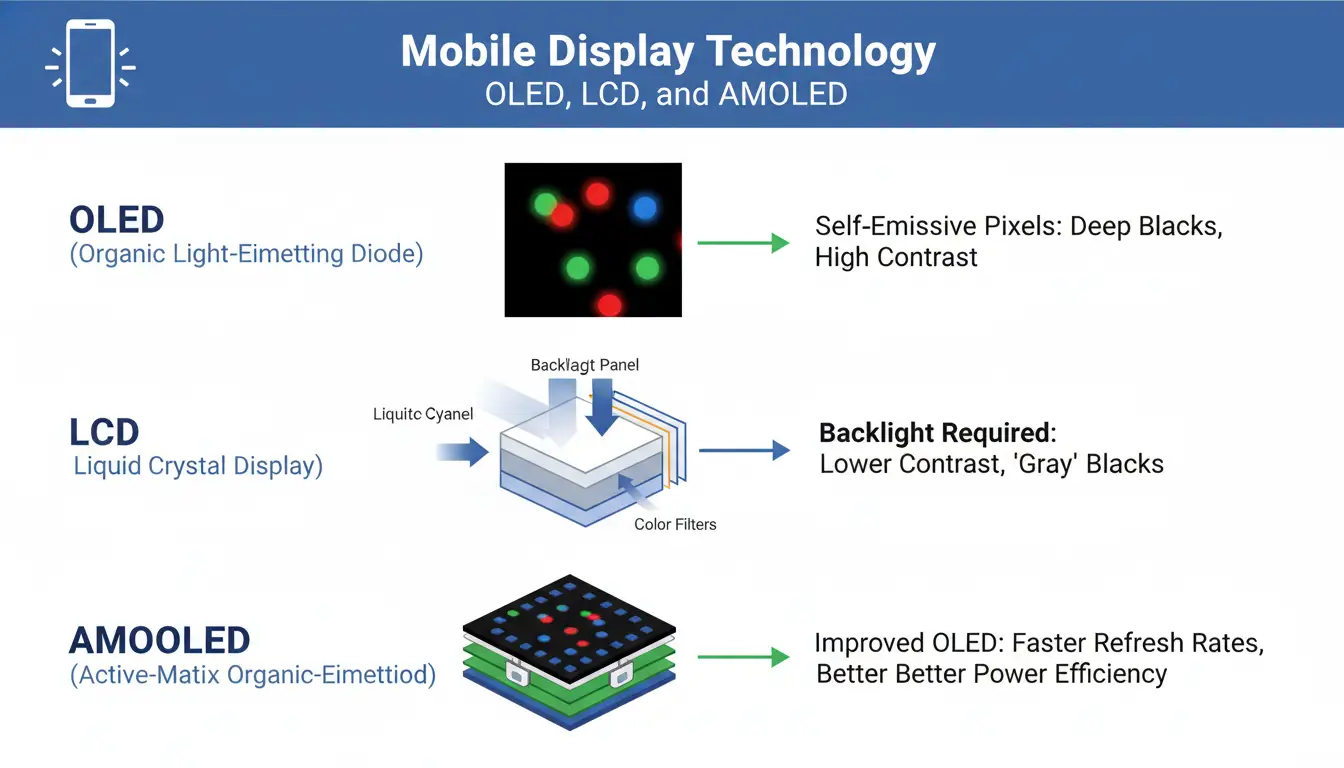
Liquid Crystal Display (LCD) technology has been around for a long time, and it works on the premise of suppressing light rather than generating it pixel by pixel. An LCD panel is made up of a layer of liquid crystals sandwiched between two pieces of glass and placed on top of a backlight, which is a constant light source. This backlight, which is typically a strip of white LEDs, is always lighted when the screen is on. To form an image, the liquid crystals rotate to either block or allow light to travel through red, green, and blue filters.
Because the backlight can never be totally concealed, LCDs struggle to generate a “true” black color; dark portions of the screen frequently look like a deep grey due to light bleeding through.
OLED: Pixels That Light Themselves
In contrast, Organic Light-Emitting Diode (OLED) technology represents a significant leap in display engineering. These screens are self-emitting; therefore, they do not require a backlight. Each pixel is made of an organic substance that illuminates when an electric current flows across it. When an OLED screen wants to show black, it simply reduces electricity to that pixel, turning it completely off. This feature enables what is regarded as an “infinite” contrast ratio, in which colors appear extremely vivid against flawless, inky blacks.
AMOLED: Active Matrix Control for Each Pixel
The term AMOLED, often marketed by companies like Samsung, stands for “Active Matrix Organic Light-Emitting Diode.” It is not a fundamentally different technology from OLED but rather an evolution of it. The “Active Matrix” refers to a Thin-Film Transistor (TFT) layer behind the organic diodes that controls each pixel individually and rapidly. This active control allows for higher refresh rates and better power management on larger screens, making AMOLED the standard for almost all modern mid-range and flagship smartphones.
Visual Performance and Viewing Experience
When comparing devices side-by-side, the visual differences become distinct. AMOLED and OLED panels generally win in terms of contrast and saturation. Because these screens can control light at the pixel level, the dynamic range is far superior to LCDs. This makes them the ideal choice for viewing High Dynamic Range (HDR) content, such as modern films or high-fidelity mobile games, where the distinction between shadows and highlights is critical.
However, LCD technology still holds specific advantages. High-quality IPS-LCD panels, often found in older high-end devices or premium monitors, are renowned for their natural color reproduction. While they may lack the “pop” of an OLED, they often render skin tones and scenery more realistically. Furthermore, historically, LCDs have been superior in outdoor visibility. Because a dedicated backlight is easier to illuminate than tiny organic pixels, LCDs have traditionally been brighter and easier to read under direct sunlight, though modern “flagship” AMOLEDs have recently closed this gap with advanced engineering.
Battery Efficiency and the “Dark Mode” Factor
One of the most persistent myths in mobile tech is that “Dark Mode” always saves battery life. The truth is that the effectiveness of Dark Mode is entirely dependent on the display technology the device uses.
On an LCD screen, Dark Mode offers zero battery savings. Since the backlight is a single sheet of light that remains on regardless of the image being displayed, the phone consumes roughly the same amount of power displaying a white background as it does a black one. The liquid crystals are simply working to block the light, but the energy expenditure remains constant.
Conversely, on an AMOLED or OLED screen, Dark Mode is a significant power-saving tool. Because displaying black on an OLED panel means the pixel is physically turned off, a user utilizing a dark interface is powering significantly fewer pixels. Tests have demonstrated that switching to a system-wide Dark Mode on an AMOLED device can save between 30% and 40% of battery power over a typical day. It is worth noting, however, that the inverse is also true: displaying bright white backgrounds on an OLED screen consumes more power than an LCD, as driving every organic pixel to maximum brightness is energy-intensive.
Durability and Longevity Concerns
Mobile devices are significant financial investments, and the longevity of the display is a critical factor in the device’s lifespan. This is where the technologies diverge significantly in terms of reliability.
The primary weakness of OLED and AMOLED technology is inherent in its name: organic. Organic molecules used to produce light deteriorate with time. If a static image—such as a navigation bar, a battery icon, or a social media interface—is displayed continuously for long periods, those specific pixels wear out faster than the surrounding ones. This phenomenon is known as “burn-in.” It results in a permanent, ghost-like shadow of the static image that remains visible even when the user switches apps. While manufacturers use software tricks like “pixel shifting” to mitigate this, the risk remains for heavy users.
LCDs, being inorganic, are effectively immune to burn-in. A user could leave a static map or a stock ticker on an LCD screen for days, and the display would likely suffer no permanent ill effects. For this reason, LCDs are often still preferred for devices used in commercial settings, such as ride-share navigation or digital kiosks, where static images are constant.
Eye Comfort and PWM Dimming
A final, often overlooked consideration is eye comfort. To reduce brightness, many OLED and AMOLED screens utilize a technique called Pulse Width Modulation (PWM). Rather than simply lowering the voltage to the pixel, the screen flashes on and off hundreds of times per second. The brain integrates these flashes into a perceived image that looks “dimmer,” but the eyes are physically subjected to a rapid strobe effect.
For a subset of the population, this invisible flickering can cause significant eye strain, headaches, and even nausea, particularly when using the phone in low-light environments. Most LCDs use “DC dimming,” which manages brightness by reducing the current to the backlight. This results in a stable, flicker-free light source that is generally much easier on the eyes during long reading sessions.
Conclusion
The shift in the mobile industry is undeniably trending toward AMOLED due to its ability to support thinner form factors, under-display fingerprint sensors, and foldable designs. For users who prioritize cinematic video watching, gaming, and battery efficiency via Dark Mode, AMOLED is the superior choice. However, LCD remains a practical and robust option for users who prioritize screen longevity or natural color accuracy, or those who suffer from sensitivity to screen flicker. Understanding these fundamental differences ensures that a consumer’s choice is based on technical reality rather than marketing hype.